What is containerd and how its works:

What is containerd?

If you're exploring container technologies like Docker or Kubernetes, you might have come across the term containerd. It sounds technical, but understanding it is easier than you think—and it's essential for grasping how modern container systems work.


What is containerd?

containerd is a container runtime—a core component responsible for managing the lifecycle of containers. It handles tasks like:

  • Pulling container images
  • Starting and stopping containers
  • Managing storage and networking
  • Supervising container execution

Think of containerd as the engine that powers containers behind the scenes. It doesn’t have a user interface or fancy commands—it’s designed to be used by higher-level tools like Docker or Kubernetes.


How containerd Works

Here’s a simplified breakdown of how containerd operates:

  1. Image Management
    containerd can pull container images from registries (like Docker Hub) and store them locally. It uses a component called content store to manage image layers efficiently.

  2. Container Lifecycle
    It creates containers from images, starts them, stops them, and deletes them when no longer needed. This includes setting up the filesystem, networking, and process isolation.

  3. Snapshotting
    containerd uses snapshotters to manage container filesystems. These allow containers to share base layers and save disk space.

  4. Runtime Execution
    containerd delegates the actual execution of containers to a lower-level runtime like runc, which uses Linux namespaces and cgroups to isolate processes.

  5. gRPC API
    containerd exposes a gRPC API, which allows other tools (like Docker or Kubernetes) to interact with it programmatically.


containerd vs Docker

You might wonder: Is containerd the same as Docker?

Not quite. Docker is a complete platform for building, running, and managing containers. containerd is just the runtime part of Docker. In fact, Docker uses containerd internally to do the heavy lifting.

So, if Docker is the car, containerd is the engine.


containerd in Kubernetes

Kubernetes doesn’t need Docker to run containers—it can use containerd directly. This makes Kubernetes setups lighter and faster, especially since Docker support was deprecated in Kubernetes v1.20+.


Why Developers Love containerd

  • Lightweight: It’s minimal and focused only on container lifecycle management.
  • Reliable: Backed by the Cloud Native Computing Foundation (CNCF).
  • Flexible: Works with Kubernetes, Docker, and other orchestration tools.
  • Secure: Designed with modern container security practices.


Ciphering and Integrity in 5G


Ciphering in 5G

Ciphering, or encryption, is a fundamental security measure in 5G networks. It ensures that data transmitted over the network remains confidential and is only accessible to authorized parties. Here’s a comprehensive look at how it works:

Purpose of Ciphering

  • Confidentiality: The primary goal is to protect the data from being read by unauthorized entities. This is crucial for maintaining user privacy and securing sensitive information.
  • Data Protection: Ensures that any intercepted data cannot be understood without the proper decryption key.

How Ciphering Works

  • Encryption Algorithms: Ciphering uses specific algorithms to transform plaintext (readable data) into ciphertext (unreadable data). In 5G, the following algorithms are commonly used:
    • NEA0: No encryption, used mainly for testing purposes.
    • 128-NEA1: Based on the SNOW 3G algorithm, which is a stream cipher.
    • 128-NEA2: Uses the Advanced Encryption Standard (AES) in Counter (CTR) mode, a widely trusted encryption method.
    • 128-NEA3: Based on the ZUC algorithm, another stream cipher designed for high efficiency and security.

Process of Ciphering

  1. Key Generation: A unique encryption key is generated for each session. This key is shared between the sender and receiver.
  2. Encryption: The plaintext data is encrypted using the chosen algorithm and the session key, resulting in ciphertext.
  3. Transmission: The ciphertext is transmitted over the network.
  4. Decryption: Upon receiving the ciphertext, the receiver uses the same algorithm and session key to decrypt the data back into plaintext.

Integrity in 5G

Integrity protection ensures that the data received is exactly what was sent, without any alterations. This is vital for maintaining the trustworthiness of the communication.

Purpose of Integrity Protection

  • Data Integrity: Ensures that the data has not been tampered with during transmission. This is crucial for preventing data corruption and unauthorized modifications.
  • Authentication: Verifies that the data comes from a legitimate source.

How Integrity Protection Works

  • Message Authentication Code (MAC): Integrity protection involves generating a MAC, a small piece of information used to authenticate a message.
  • Algorithms Used: Similar to ciphering, integrity protection uses specific algorithms to generate and verify the MAC. Common algorithms include:
    • NIA0: No integrity protection, used for testing.
    • 128-NIA1: Based on SNOW 3G.
    • 128-NIA2: Uses AES in Cipher-based Message Authentication Code (CMAC) mode.
    • 128-NIA3: Based on ZUC.

Process of Integrity Protection

  1. MAC Generation: The sender generates a MAC using the data and a secret key.
  2. Transmission: The data and MAC are sent together over the network.
  3. MAC Verification: The receiver recalculates the MAC using the received data and the same secret key. If the recalculated MAC matches the received MAC, the data is considered intact and authentic.

Importance of Ciphering and Integrity in 5G

  • Enhanced Security: Together, ciphering and integrity protection provide a robust security framework for 5G networks, safeguarding against eavesdropping, tampering, and unauthorized access.
  • User Trust: By ensuring data confidentiality and integrity, these mechanisms help build and maintain user trust in the network.
  • Regulatory Compliance: Adhering to security standards and regulations is essential for network operators, and these mechanisms help achieve compliance.

DCI_Format 0_0 Decoder:

DCI Format 0_0:

This is used for the scheduling of PUSCH in a single cell and it is shared by gNB to UE in DL direction. UE is required to decode the UL grant on PDCCH, so that the UE can transmit PUSCH on UL Slot in Uplink. DCI 0_0 is mainly used for common search space signaling and UL Grant.

Field of DCI 0_0:

Add program

Decoder


Number of BWP RBs :

UL-DCI HexValue      :

Binary value :

DCI Fields No of bits Bits Decimal value
Identifier for DCI formats 1
Frequency domain resource assignment  
Time domain resource assignment 4
Frequency hopping flag 1
Modulation and coding scheme 5
New data indicator 1
Redundancy version 2
HARQ process number 4
TPC command for scheduled PUSCH 2
Padding Bits x
UL/SUL indicator x


5G(NR): Xn Based Handover

Introduction:

The basic handover and any type of mobility procedures are same in any type networks, i.e. UE measures the nearby signals and select the some good signals and make the report based on these signal strength and quality and after that sent this report to source cellsource cell take the decision to start handover procedure to best cell that is called Target Cell.  and then target cell completes the Handover procedure.


There are some basic Impotent Pointers for XN Handover:

------------------------------------------------------------------------------

  • Signal strength of both source gNodeB and target gNodeB should be reachable to UE during the handover, because during handover signaling are required with source gNB and target gNB also.
  • Xn-based Handover is very similar X2-based Handover in LTE
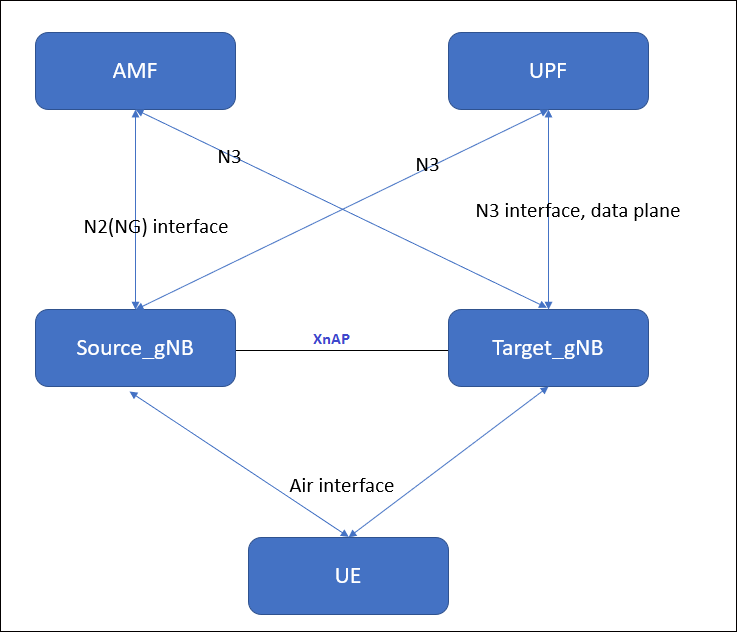
  • Xn-based handover is only possible if XnAP interface is established between source and Target gNBs.
  • This type of Handover is only applicable for intra-AMF mobility (with in same AMF ), i.e. Xn handover cannot be used if Source and Target gNB is connected to different AMFs.
  • Xn-based Handover can be both Intra Frequency handover and Inter Frequency handovers.
  • It is possible that source and target gNB can be connected with two different UPFs(user plane functions)
  • Tracking Area code should be same. RRC Re-Registration is requirred after Successful Handover if the Source gNB and the Target gNB belongs to different Tracking Area code (TAC).
  • Xn-based Handover is much faster as Compare to NGAP Handover due to short signaling root and 5G Core involved in only for switch the data path and PDU session.


High level setup diagram:

      Both source  gNB  and target gNB is serving by  same AMF and UPF. and source gNB and target gNB should have the active XNAP interface and active NGAP interface with AMF.


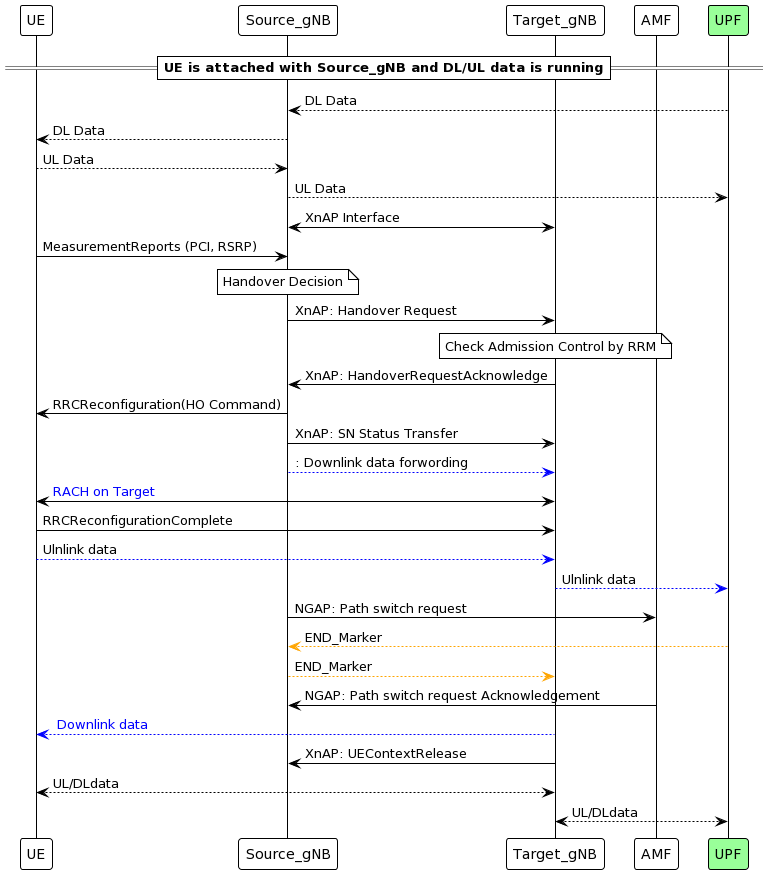
Signaling Exchange b/w Source gNB and target gNB is as shown in picture below..


Key Steps in Xn-Based Handover

1. Measurement Reporting

  • UE sends Measurement Report to Source gNB.
  • IEs:
    • MeasResults: Contains signal strength, quality, etc.
    • ReportConfigId: Identifies the reporting configuration.

2. Handover Decision

  • Source gNB decides to initiate handover based on measurements.
  • IEs:
    • TargetCellId: Identifies the target cell.
    • Cause: Reason for handover (e.g., signal degradation).

3. Handover Request (XnAP: Handover Request)

  • Source gNB → Target gNB via Xn interface.
  • IEs:
    • UE Context Information: Includes UE ID, security context.
    • RRC Context: RRC configuration for UE.
    • Bearer Contexts: QoS flows and data bearers.
    • Target Cell ID: Target gNB cell.

4. Handover Request Acknowledge (XnAP)

  • Target gNB → Source gNB.
  • IEs:
    • RRC Configuration: For UE to access target cell.
    • Admitted Bearers: Confirmed bearers for handover.
    • Target to Source Transparent Container: it contains RRC reconfiguration info that goes to UE.

5. Handover Command (RRC: RRCConnectionReconfiguration)

  • Source gNB → UE.
  • IEs:
    • MobilityControlInfo: Target cell info.
    • RadioBearerConfig: Setup for new bearers.
    • MeasurementConfig: New measurement settings.

6. Random Access Procedure

  • UE accesses target cell using contention-free or contention-based RA.
  • IEs:
    • RA-RNTIPreambleIndexTimingAdvance.

7. RRC Reconfiguration Complete

  • UE → Target gNB.
  • IEs:
    • ReconfigComplete: Confirms successful reconfiguration.

8. Path Switch Request (Optional if UPF changes)

  • Target gNB → AMF (if UPF needs update).
  • IEs:
    • UE ContextBearer InfoNew Tunnel Info.

9. Handover Notify (XnAP)

  • Target gNB → Source gNB.
  • IEs:
    • UE IDHandover Status.

10. Resource Release Command

  • Source gNB releases UE resources.
  • IEs:
    • UE IDRelease Cause.

Benefits of Xn-Based Handover

  • Low latency and minimal disruption.
  • No AMF/UPF involvement, reducing signaling overhead.
  • Efficient resource usage and load balancing.


Install Go Lang latest version 1.15.5 in ubuntu

 Download and install

we can install the Go Lang in very easy and simple steps in Linux(Ubuntu)

1. Download Go

2. Install Go

3. Check version of Go

1. Download Go.

Use Curl or wget to download the current binary for Go from the official download page.


sudo wget https://golang.org/dl/go1.15.5.linux-amd64.tar.gz


 If Wget or curl not install, install wget and curl first.


2. Go install.


Extract the archive you downloaded into /usr/local, creating a Go tree in /usr/local/go by below command.

Important: This step will remove a previous installation at /usr/local/go, if any, prior to extracting. Please back up any data before proceeding.

For example, run the following.

sudo tar -C /usr/local -xzf go1.15.5.linux-amd64.tar.gz


Add the go binary path to .bashrc file /etc/profile. Add /usr/local/go/bin to the PATH environment variable.

You can do this by adding the following line to your $HOME/.profile or /etc/profile (for a system-wide installation): 
 
export PATH=$PATH:/usr/local/go/bin

After adding the PATH environment variable, you need to apply changes immediately by running the following command.

source ~/.bashrc

3. Check version of Go

 
Verify that you've installed Go by opening a command prompt and typing the following command: 
 
go version


You can also install go from the snap store too.


sudo snap install --classic --channel=1.15/stable go


Remove Go Lang from the system completely: 

To remove an existing Go installation from your system delete the go directory. This is usually /usr/local/go under Linux.


 sudo rm -rf /usr/local/go 

 sudo nano ~/.bashrc # remove the entry from $PATH 

 source ~/.bashrc

What is Sub-6 GHz[FR1] in 5G?

 In 5G, Sub-6 GHz (often referred to as FR1, or Frequency Range 1) refers to the spectrum of frequencies below 6 GHz that are used for 5G networks. Here’s a detailed overview of Sub-6/FR1 in the context of 5G:

1. What is Sub-6 GHz (FR1) in 5G?

  • Sub-6 GHz, also known as FR1, includes frequencies from 450 MHz up to 6 GHz.
  • It’s the lower-frequency spectrum range used in 5G, as opposed to FR2, which includes millimeter-wave (mmWave) frequencies from 24 GHz to 52 GHz.
  • Sub-6 GHz encompasses frequencies that are widely used in many countries for initial 5G deployments, with bands like 3.5 GHz (also called C-band) being popular for 5G services.

2. Characteristics of Sub-6 GHz (FR1) Spectrum

  • Longer Range: Sub-6 GHz frequencies can cover a larger geographic area, as they experience lower propagation losses than the higher frequencies in the mmWave range.
  • Better Indoor Penetration: Compared to mmWave, Sub-6 GHz signals penetrate buildings and other obstacles more effectively.
  • Moderate Speeds: While Sub-6 offers higher speeds than 4G, its speeds are generally lower than what can be achieved with mmWave. Typical Sub-6 5G speeds range from 100 Mbps up to 1 Gbps, depending on the network conditions and bandwidth.
  • Wide Area Coverage: Due to its range and penetration characteristics, Sub-6 GHz is suitable for providing broader 5G coverage over large urban, suburban, and rural areas.

3. Common Sub-6 GHz Frequency Bands in 5G

  • 3.3 - 3.8 GHz (C-band): One of the primary 5G bands in many regions; balances range, capacity, and speed effectively.
  • 2.5 GHz: Often used in the U.S. and some other markets for 5G.
  • 600 MHz and 700 MHz: Low-band frequencies used for broader 5G coverage, especially in rural and suburban areas.
  • 4.9 GHz: Another option in some countries, although less commonly used than C-band.

4. Advantages of Sub-6 GHz (FR1)

  • Wider Coverage and Better Building Penetration: Makes it suitable for broader coverage across urban, suburban, and rural areas.
  • More Practical for Mobile Use: Compared to mmWave, which is highly directional and short-range, Sub-6 GHz is more practical for typical mobile usage.
  • Fast Deployment: Many operators can deploy Sub-6 5G quickly because it can use spectrum repurposed from other services or new bands allocated by regulators.

5. Limitations of Sub-6 GHz (FR1)

  • Limited Bandwidth: Because it is lower frequency, there is less available bandwidth compared to mmWave, meaning it has lower maximum speeds.
  • Lower Capacity: Sub-6 GHz cannot support as many simultaneous users as mmWave, which may limit performance in very densely populated areas.

6. Use Cases for Sub-6 GHz (FR1)

  • Mobile Broadband: Enhanced mobile broadband (eMBB) services for consumers, such as faster internet and improved video streaming.
  • Smart Cities and IoT: Due to its coverage characteristics, Sub-6 GHz is suitable for IoT deployments across cities and large areas.
  • Urban, Suburban, and Rural Coverage: Provides essential 5G coverage in various environments where mmWave may be impractical.


    For FR2:
    https://5gfundamentals.blogspot.com/2024/11/what-is-mmwave-fr2-in-5g.html

What is ARQ and HARQ?

Both HARQ (Hybrid Automatic Repeat Request) and ARQ (Automatic Repeat Request) are error control mechanisms used in wireless communication to ensure data is received correctly. They mechanism helps in recovery of lost or corrupted packets during transmission.

ARQ (Automatic Repeat Request):

ARQ stands for Automatic Repeat Request. This is the protocol used at data link layer (RLC layer in 5G/4G) . it is an error-control mechanism that is being used in a two-way communication systems.  It is used to achieve reliable data transmission over an unreliable source or service.

 It uses CRC(cyclic redundancy check) to determine, whether the received packet is correct or not. If the packet is received correctly at receiver side, receiver sends ACK to the transmitter, but in case if the packet is not received correctly at receiver side, then receiver send NACK to the transmitter. And then after receiving NACK from receiver side, the transmitter re-transmits the same packet again and so on.

 Concept:

ARQ is a basic error correction method. If a receiver detects an error in a packet (using CRC), it asks the sender to retransmit the entire packet.

How It Works:

  1. Sender transmits a data packet.
  2. Receiver checks for errors using CRC.
  3. If errors are found, receiver sends a NACK (Negative Acknowledgment).
  4. Sender retransmits the same packet.

Types of ARQ:

  • Stop-and-Wait ARQ: Waits for ACK/NACK before sending the next packet.
  • Go-Back-N ARQ: Retransmits from the error point onward.
  • Selective Repeat ARQ: Only retransmits erroneous packets.

Used In:

  • Higher layers like RLC (Radio Link Control) in 5G.


HARQ (Hybrid Automatic Repeat Request)

Concept:

HARQ is a more advanced version of ARQ. It combines error detection with forward error correction (FEC). Instead of resending the same packet, it sends redundant bits to help the receiver decode the original message.

How It Works:

  1. Sender transmits a packet with FEC.
  2. Receiver checks for errors.
  3. If errors are found, receiver sends a NACK.
  4. Sender sends additional redundancy bits (not the same packet).
  5. Receiver combines original and new bits to decode the message.

Key Feature:

  • Uses soft combining (e.g., Chase Combining or Incremental Redundancy).
  • Reduces retransmissions and improves efficiency.

Used In:

  • MAC layer in 5G NR.
  • Works with transport blocks and physical layer transmissions.


HARQ vs ARQ: Key Differences

FeatureARQHARQ
Layer UsedRLCMAC
Retransmission TypeSame packetRedundant bits (soft combining)
Error CorrectionNo (only detection)Yes (FEC + detection)
EfficiencyLowerHigher
LatencyHigherLower
ComplexitySimpleComplex
Use in 5GRLC layerMAC layer

Numerology in 5G

 Numerology in 5G refers to the configuration of key physical layer parameters, primarily based on the subcarrier spacing (SCS), which is fundamental to the structure of the 5G New Radio (NR) interface. It allows for greater flexibility to meet diverse use cases in 5G, such as enhanced Mobile Broadband (eMBB), ultra-reliable low latency communications (URLLC), and massive Machine Type Communications (mMTC).

Key Concepts in 5G Numerology

  1. Subcarrier Spacing (SCS)
    In 5G, the subcarrier spacing is no longer fixed as in LTE (15 kHz). Instead, multiple subcarrier spacings are supported:

    • SCS=15×2μkHz\text{SCS} = 15 \times 2^\mu \, \text{kHz}, where μ\mu is the numerology index (0, 1, 2, etc.).
    Numerology (μ)Subcarrier Spacing (kHz)
    015
    130
    260
    3120
    4240
    • Higher SCS is used for higher frequency bands and low-latency applications.
    • Lower SCS is suitable for lower frequency bands and wider coverage.
  2. Slot Duration
    The slot duration changes inversely with the SCS:

    Slot Duration=1ms2μ\text{Slot Duration} = \frac{1 \, \text{ms}}{2^\mu}
    • At μ=0\mu = 0 (15 kHz), slot duration is 1 ms.
    • At μ=2\mu = 2 (60 kHz), slot duration is 0.25 ms.
  3. Bandwidth Scaling
    The overall bandwidth and Resource Block (RB) size depend on the numerology:

    • Higher numerology (larger SCS) requires more frequency bandwidth for a given number of subcarriers.
    • For example, one RB (12 subcarriers) at 15 kHz spans 180 kHz, while at 30 kHz, it spans 360 kHz.
  4. Flexible Frame Structure
    5G supports variable frame and subframe durations:

    • A standard frame is 10 ms, subdivided into 10 subframes of 1 ms.
    • The number of slots per subframe depends on the numerology. For example, μ=1\mu = 1 results in 2 slots per subframe.
  5. Applications of Numerology

    • Low SCS (15 kHz): Suitable for wide-area coverage (e.g., rural environments).
    • Medium SCS (30-60 kHz): Ideal for urban eMBB and IoT deployments.
    • High SCS (120-240 kHz): Essential for mmWave bands and low-latency services.

Benefits of 5G Numerology

  • Flexibility: Supports a wide range of services and frequencies.
  • Efficiency: Allows better optimization of spectrum use and latency.
  • Scalability: Adapts to diverse deployment scenarios, from dense urban areas to rural coverage.

What is mmWave (FR2) in 5G?

 In 5G, mmWave (millimeter wave), also known as FR2 (Frequency Range 2), refers to the use of high-frequency spectrum, specifically between 24 GHz and 52 GHz. This is a critical component of 5G, providing ultra-fast speeds and very high capacity but with specific limitations. Here’s a breakdown of mmWave/FR2 in 5G:

1. What is mmWave (FR2) in 5G?

  • Frequency Range 2 (FR2) is defined as frequencies between 24 GHz and 52 GHz.
  • These high-frequency bands are known as millimeter wave (mmWave) due to the very short wavelengths they produce.
  • mmWave frequencies allow 5G to achieve extremely high speeds, making it suitable for high-bandwidth applications and dense urban environments.

2. Characteristics of mmWave (FR2) Spectrum

  • Extremely High Speeds: mmWave can deliver speeds of 1-10 Gbps or more, allowing for data-heavy applications like 4K/8K streaming, augmented reality (AR), virtual reality (VR), and high-speed downloads.
  • High Capacity: The large available bandwidth in mmWave bands enables a high capacity for simultaneous users, making it ideal for dense urban areas and places like stadiums, concerts, and airports.
  • Limited Range: mmWave has a much shorter range compared to Sub-6 GHz frequencies, typically limited to a few hundred meters.
  • Poor Penetration: mmWave signals struggle to penetrate obstacles like buildings, trees, and even heavy rain, making it best suited for open spaces or environments with a clear line of sight.

3. Common mmWave (FR2) Frequency Bands in 5G

  • 26 GHz (24.25–27.5 GHz): Used in many countries for 5G mmWave deployments.
  • 28 GHz (27.5–29.5 GHz): Widely used in the U.S. and some other regions.
  • 39 GHz (37–40 GHz): Another popular mmWave frequency in certain regions.
  • 47 GHz (47.2–48.2 GHz): Less commonly deployed but part of the FR2 frequency range.

4. Advantages of mmWave (FR2)

  • Ultra-High Speeds and Bandwidth: Enables high-speed, low-latency data transfer that’s critical for applications requiring massive amounts of data, like VR/AR and UHD streaming.
  • Massive Capacity: Due to the high-frequency range and large bandwidth, mmWave can support a high number of connected devices, which is ideal for crowded areas.
  • Low Latency: Provides extremely low latency, supporting applications like real-time gaming, autonomous driving, and industrial automation.

5. Limitations of mmWave (FR2)

  • Limited Coverage: mmWave signals don’t travel far, so coverage is limited to small areas.
  • Poor Obstacle Penetration: Signals are easily blocked by obstacles such as buildings, walls, trees, and even glass, which limits indoor use.
  • Susceptibility to Weather: Rain, humidity, and atmospheric conditions can impact mmWave performance.

6. Use Cases for mmWave (FR2)

  • Enhanced Mobile Broadband (eMBB): High-speed internet in densely populated urban areas, stadiums, and venues with high user density.
  • Fixed Wireless Access (FWA): Wireless home internet in areas where it’s difficult to deploy fiber or traditional broadband.
  • Real-Time Applications: Latency-sensitive applications like augmented reality, virtual reality, and telemedicine.
  • Industrial Automation and IoT: mmWave can support machine-to-machine communications in smart factories and manufacturing, where high bandwidth and low latency are crucial.

SA and NSA mode of deployment.

 In 5G networks, SA (Standalone) mode is one of the two primary deployment options for 5G, the other being NSA (Non-Standalone) mode. Each mode represents a different approach to deploying 5G networks in terms of how the 5G core and 5G radio access network (RAN) interact with each other and, if necessary, with 4G infrastructure. Here’s a breakdown of what SA mode entails in 5G:

1. Standalone (SA) Mode Definition

  • SA mode is a pure 5G network deployment that operates independently of the existing 4G LTE infrastructure.
  • In SA mode, both the 5G core network (5GC) and 5G NR (New Radio) components are fully operational without relying on 4G components.
  • This allows for the full potential of 5G capabilities, as SA mode utilizes the 5G core network architecture designed specifically for 5G technologies.

2. Key Features of 5G SA Mode

  • Low Latency and High Bandwidth: By utilizing the 5G core and radio network, SA mode supports ultra-reliable low-latency communication (URLLC) and enhanced Mobile Broadband (eMBB).
  • Network Slicing: SA mode allows for more sophisticated network slicing, enabling operators to create virtual networks with different characteristics on the same physical network to cater to specific use cases.
  • Ultra-Reliable Low-Latency Communications (URLLC): SA mode provides very low latency due to optimized 5G core architecture, which is critical for applications like autonomous vehicles, industrial automation, and remote surgeries.
  • Efficient Energy and Device Management: Improved device energy management is possible due to more advanced, efficient communication protocols and device management within the 5G core.

3. SA vs. NSA Mode

  • SA Mode is the full implementation of 5G with a new 5G core and 5G radio, enabling all the advanced features of 5G.
  • NSA Mode leverages the existing 4G LTE core infrastructure while introducing a 5G radio for enhanced performance. NSA is faster to deploy but doesn't provide the full benefits of 5G as SA does.

4. Use Cases of 5G SA Mode

  • Enhanced Mobile Broadband (eMBB): High-speed mobile internet, VR, and AR applications.
  • Massive IoT: Large-scale Internet of Things (IoT) deployments, like smart cities and smart homes.
  • Critical Communications: Applications demanding extremely low latency and high reliability, such as remote control of robotics in industry.

5. Advantages of SA Mode

  • Provides better performance and lower latency than NSA mode because of the 5G-specific core architecture.
  • Future-proofing: The SA deployment is designed with the full set of 5G capabilities in mind, making it more adaptable to future 5G enhancements.
  • Higher network flexibility and efficiency through network slicing, which is less optimal in NSA mode.

6. Challenges with SA Mode

  • Higher Cost: Requires a complete overhaul of the network to deploy a 5G core, which is expensive and complex.
  • Slower Deployment: Since SA mode requires the installation of a new 5G core, deployment can be slower compared to NSA, which can use the existing 4G core.

What is 5G and why do we need it over existing LTE?

 What is 5G and why do we need it over existing LTE?

5G, or "fifth-generation" wireless technology, is the latest advancement in cellular networks, following 4G LTE (Long-Term Evolution). It's designed to significantly enhance speed, reduce latency, and improve the reliability of wireless services. Here’s a breakdown of what makes 5G different and why it’s valuable beyond 4G LTE:

1. Speed and Data Transfer

  • 4G LTE: Theoretical speeds peak at around 1 Gbps, but most users experience speeds between 10-100 Mbps.
  • 5G: Offers speeds up to 10 Gbps or more, depending on the deployment type and network conditions. This speed increase is crucial for applications like high-definition video streaming, cloud gaming, and augmented reality, which require high data throughput.

2. Latency (Delay)

  • 4G LTE: Latency for 4G LTE networks ranges from 30 to 50 milliseconds.
  • 5G: Latency can drop to as low as 1 millisecond, providing near-instantaneous response. This ultra-low latency is essential for real-time applications, like autonomous vehicles, remote surgery, and industrial automation, where delays could have serious consequences.

3. Capacity and Device Density

  • 4G LTE: Designed for fewer devices per area, LTE networks can become congested in highly populated areas, leading to slower speeds and dropped connections.
  • 5G: Supports up to a million devices per square kilometer, making it more suitable for dense urban areas, smart cities, and the Internet of Things (IoT), where thousands of devices are connected in close proximity.

4. Network Slicing and Customization

  • 4G LTE: While flexible, LTE networks lack the ability to dedicate slices of bandwidth for specific types of traffic.
  • 5G: Allows for "network slicing," where the network can be divided into multiple virtual layers. For instance, a network slice could prioritize emergency services or IoT devices, optimizing the experience and enhancing security and reliability.

5. Energy Efficiency

  • 4G LTE: Power consumption for LTE towers is relatively high and may not be optimal for battery-constrained devices.
  • 5G: Designed to be more energy-efficient, especially in low-power modes, making it suitable for IoT devices that may need to run on a battery for years without charging.

Why Do We Need 5G Over 4G LTE?

As technology evolves, the demand for data-intensive applications and connected devices increases. While 4G LTE can support mobile internet for smartphones, it struggles with the high data demands, low latency, and massive device connectivity required by new technologies like autonomous driving, virtual reality, smart cities, and industrial automation. 5G is designed to handle this surge, enabling a more connected, real-time, and efficient digital world.